Klever Wallet now makes sending USDT (TRC-20) easier than ever with the integrated GasFree feature, allowing you to transfer tokens on the Tron network without holding TRX. By leveraging GasFree smart routing and fee-handling system, Klever ensures smooth, user-friendly transactions where fees are handled in USDT, eliminating the need for complex TRX management. Fast, efficient, and beginner-friendly , that’s the Klever way.
What is GasFree?
GasFree is a service that enables token transfers on the Tron network without requiring the sender to hold TRX, the native token usually needed to pay transaction (gas) fees.
Instead of requiring TRX from the user, GasFree acts as an intermediary, covering the TRX cost temporarily and charging a small USDT fee in return.
How GasFree Works (Step-by-Step)
Step 1: Select Your USDT Wallet ( On TRON Network)
Begin by opening your Klever Wallet and selecting your USDT wallet on the TRON (TRC20) network. The GasFree feature is only available for USDT on TRON, so make sure you’re working within the correct blockchain.
Step 2: Create a GasFree Wallet
Tap"on GasFree logo on main Wallet ” . This action generates a unique GasFree (GF) wallet , a dedicated sub-account linked to your main wallet. It has its own address and is used to hold and perform all your USDT for gasless processing.
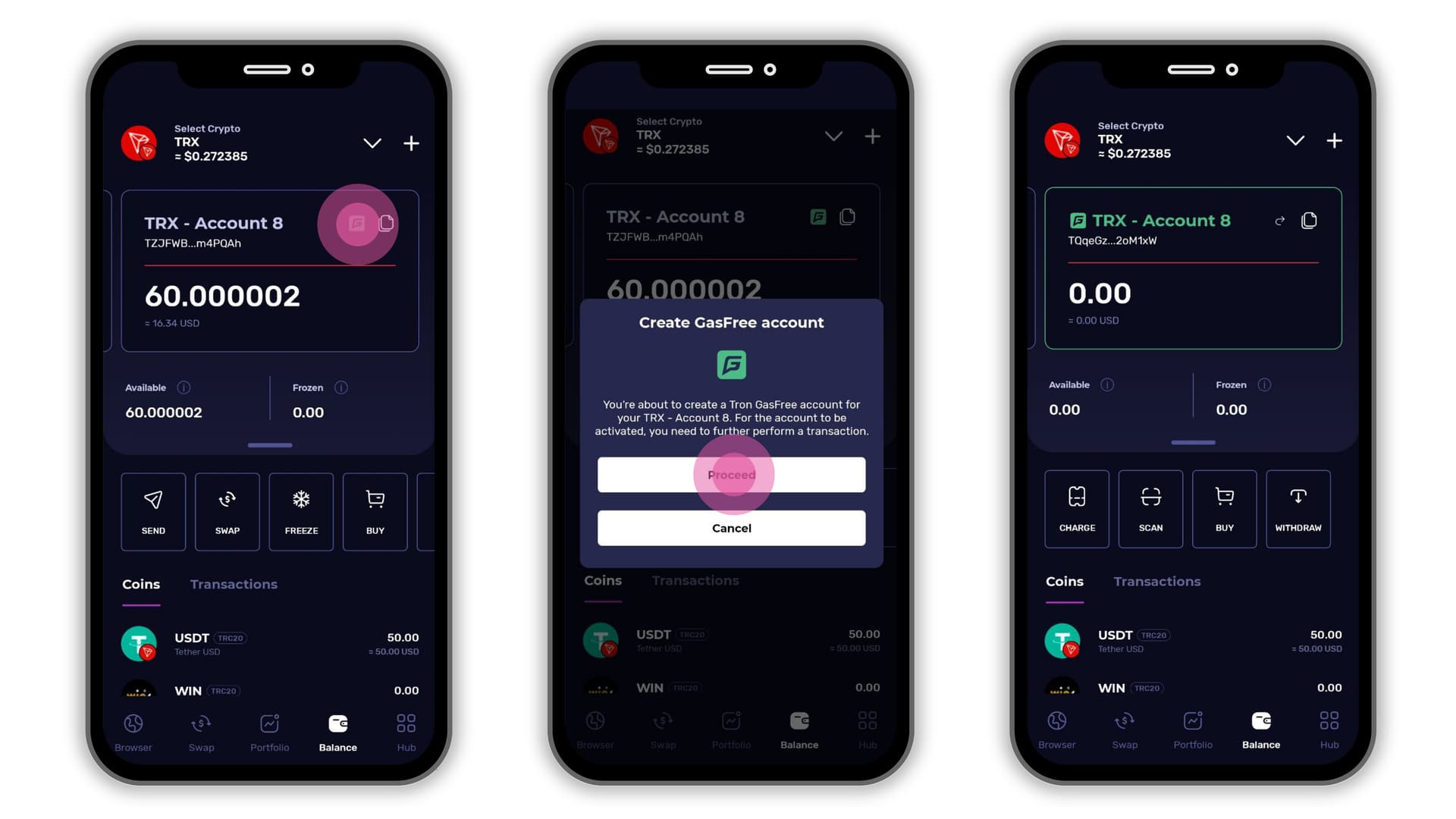
Step 3 : Fund the GasFree wallet with USDT trc20 tokens
Transfer at least 3 USDT to your newly created GasFree wallet address. Until the activation step is completed, the wallet remains inactive and unable to process withdrawals .Here’s how the balance will be used:
- 1 USDT – One-time activation fee to enable the wallet
- 1 USDT – Used for covering the transaction (gas) fee
- 1+ USDT – Remaining balance will be available for future transactions
If you send less than 3 USDT, your wallet may not activate, and withdrawals will not be possible.
Step 4: Complete Wallet Activation and Initiate a withdrawal
To finalize the activation process, you must initiate and complete the first outgoing transaction from your GasFree wallet. GasFree automatically uses 1 USDT for one time activation of the wallet and 1 USDT to pay for the transaction fee on the TRON network , no TRX required. Everything is handled using USDT for a seamless, hassle-free experience.
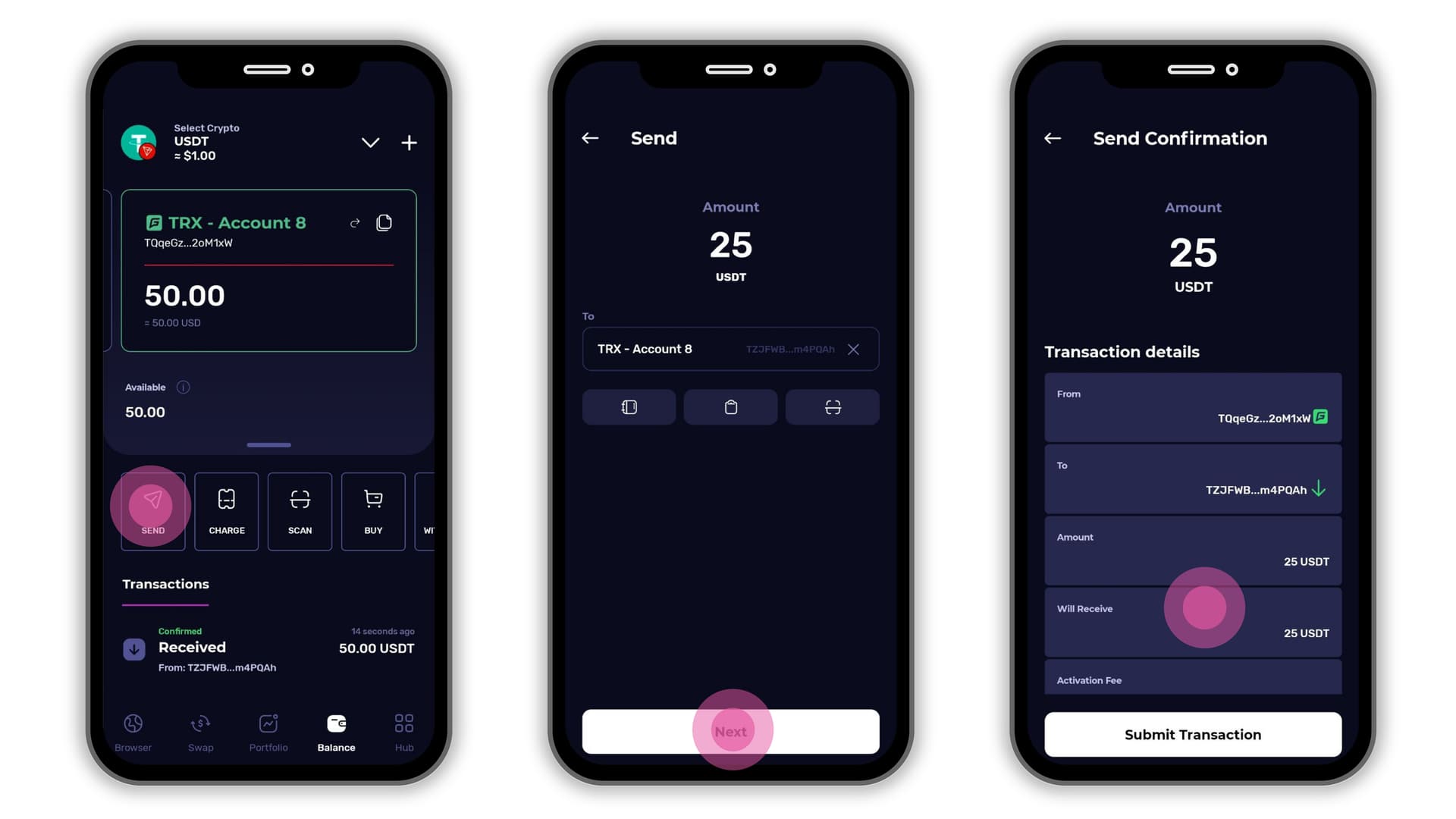
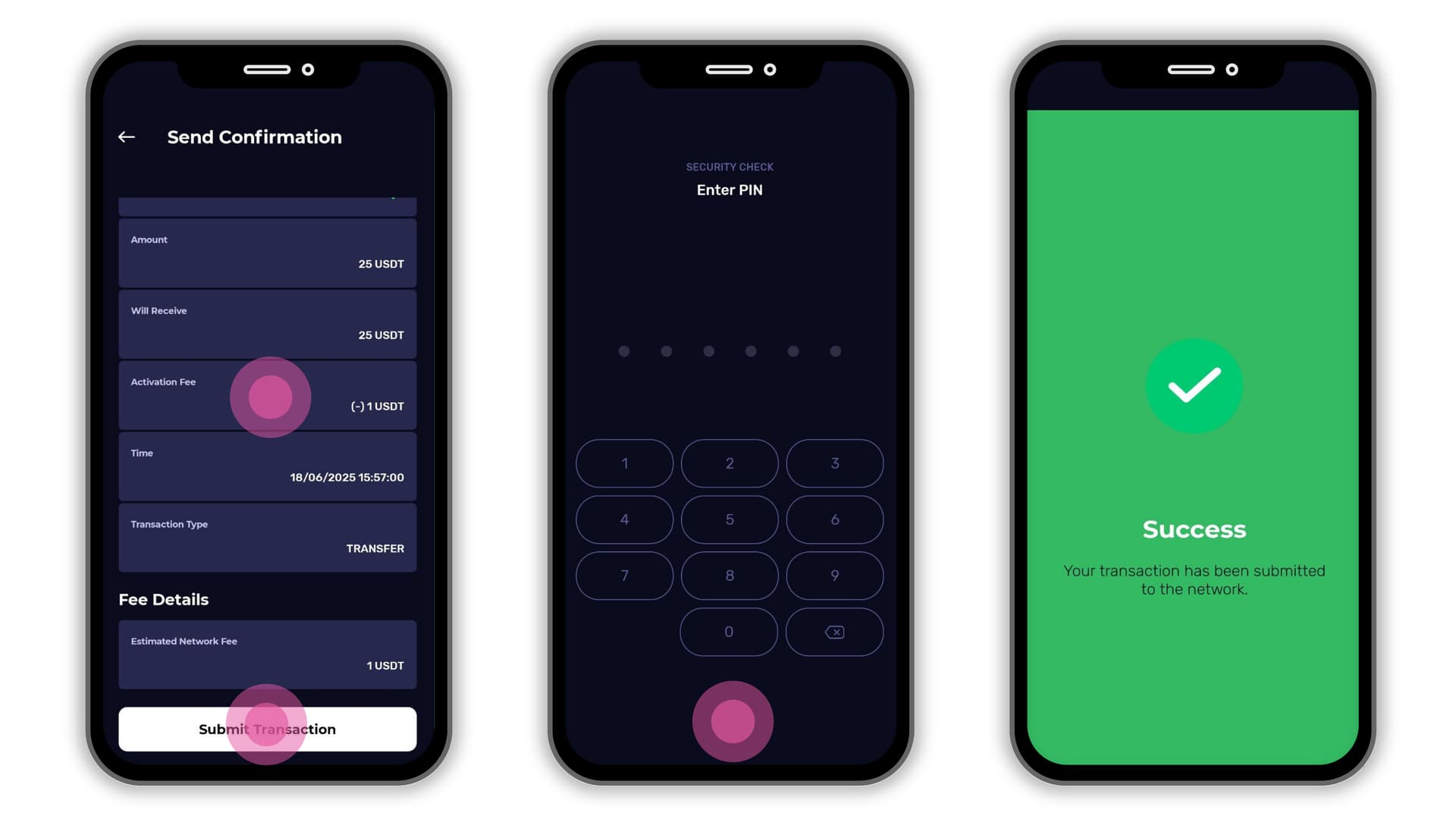
Account Security & Access
- The GasFree account is tied to your wallet address, and only your wallet can initiate withdrawals from it.
- It’s not a centralized service — your funds are safe as long as you control your original wallet.
Key Points to Remember
| Feature | Details |
|---|---|
| Supported Token | Only USDT (TRC-20) |
| No TRX Required | Yes, TRX is not needed by the user |
| One-Time Activation Fee | 1 USDT |
| Per Transaction Fee | 1 USDT (approx., can vary) |
| Manual Withdrawal Needed | Yes, user must click “Withdraw” |
| Non-USDT Tokens | Not supported; however, if sent by mistake, the tokens can still be manually withdrawn from the GasFree account. |
What If I Send Other Tokens to Gasfree wallet addresses?
If you send TRX or other TRC-20 tokens to your GasFree account, they can be withdrawn manually. However, please ensure that your GasFree wallet is activated.
To activate the account, you must:
- Send at least 3 USDT (TRC-20) to the GasFree wallet address
- Ensure that the main wallet associated with the GasFree account holds sufficient TRX to cover the transaction (network) fees
Without activation and enough TRX in the main wallet, withdrawals will not be processed.
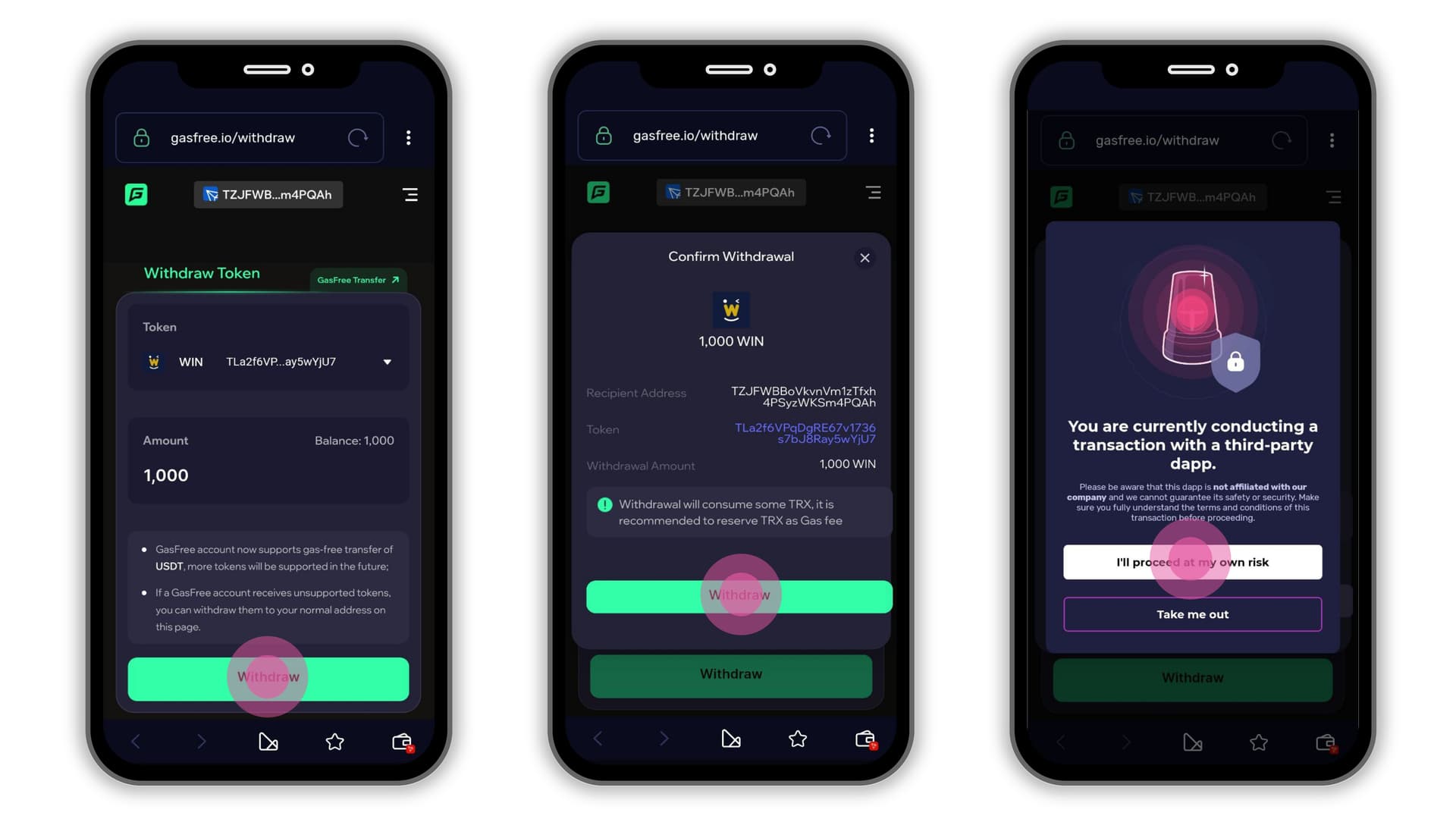
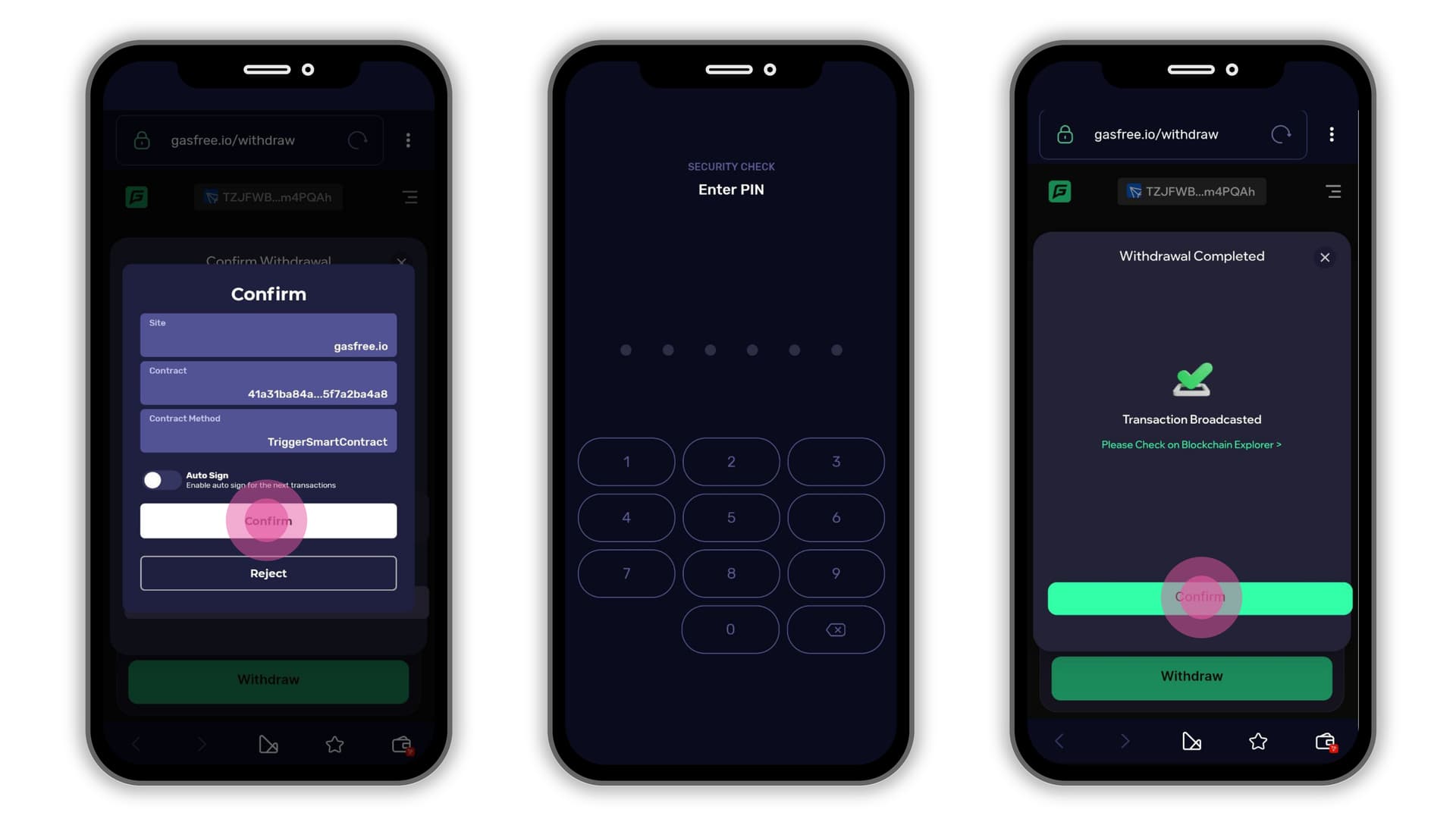
Below is an example of withdrawing WIN (TRC-20) tokens from the GasFree.io dApp by clicking the “Withdraw” option within the GasFree wallet. Although WIN is not officially supported in the GasFree wallet, the tokens can still be withdrawn manually. The withdrawn tokens are sent to the main wallet associated with the GasFree account, as shown in the reference images below.
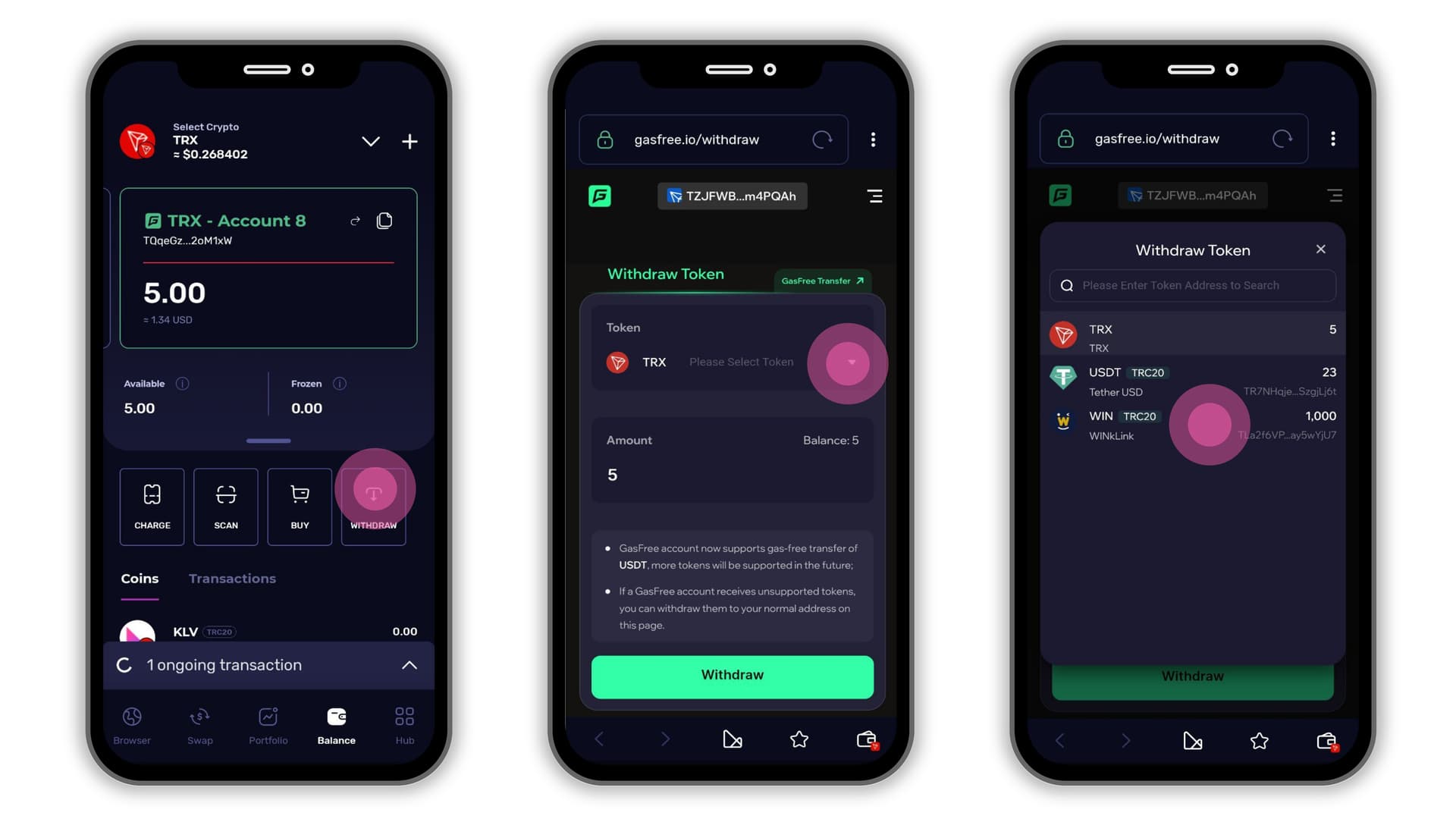
GasFree is a clever and user-friendly solution for those who want to avoid holding TRX just to pay transaction fees. While it’s not entirely “free,” it effectively shifts the cost from TRX to USDT, offering a more convenient and accessible alternative. This approach is especially beneficial in wallets like Klever, where seamless onboarding and a smoother user experience are key priorities.
Frequently Asked Questions
How much can I actually send if I deposit exactly 3 USDT?
From your 3 USDT deposit, 1 USDT goes to the one-time activation fee and about 1 USDT covers the first transaction fee. That leaves roughly 1 USDT as the amount you can actually send. If you want to send more, simply deposit more. For example, deposit 5 USDT if you want to send 2 USDT comfortably.
Is GasFree really free?
Not exactly. GasFree eliminates the need to hold TRX, but the network costs are paid in USDT instead. You pay a one-time activation fee of 1 USDT and approximately 1 USDT per transaction. These fees are deducted automatically from your GasFree wallet balance.
I get “An unexpected error happened” or “No enough network fee available”. What do I do?
This means your GasFree wallet does not have enough USDT left after fees to cover the amount you are trying to send. Either deposit more USDT to your GasFree wallet, or lower the amount you are trying to send.
Does GasFree work with other tokens besides USDT?
No. GasFree only supports USDT on the Tron (TRC-20) network. It does not work with other tokens or other networks.
I accidentally sent TRX or another token to my GasFree wallet. Can I get it back?
Yes. Tap the “Withdraw” option inside your GasFree wallet. The tokens will be sent back to your main wallet. Two conditions apply: your GasFree wallet must be activated (minimum 3 USDT deposited and first transaction completed), and your main wallet must hold enough TRX to cover the withdrawal network fee.
Is my GasFree wallet secure?
Yes. GasFree is not a centralized service. It is a sub-account tied directly to your main Klever Wallet address. Only your wallet can initiate transactions from it. Your funds stay under your control as long as you have your seed phrase.
My GasFree wallet won’t activate. What should I check?
Make sure you deposited at least 3 USDT (TRC-20 on the Tron network) to the GasFree wallet address. If the total is below 3 USDT, the wallet cannot activate. Also verify that it is USDT on the correct network (TRC-20), not on Ethereum or another chain. If everything looks correct and it still won’t activate, contact Klever Support with your GasFree wallet address and a screenshot of the error.